


ArchiBot Docs
Guides for workspaces, chat, API keys, billing, and support.
Pick the role or product area that matches your account to land on the right starting guide. These pages cover Console workspaces and standalone ArchiBot Chat with safe handoff rules for support.
I'm a Team admin Set up the account, invite members, and complete SSO + billing. I'm a Team member Launch workspaces, connect IDEs, and manage day-to-day work. I'm a Platform operator Tenant admin, workspace targets, and support-handoff rules. I'm a ArchiBot Chat user Use browser chat, API keys, artifacts, billing, and account activity.
Top guides
Customer admin setup Work through Account Setup in Console — confirm details, invite and manage members, submit and verify SSO, connect Git access, and check billing and workspace-target readiness. Account Setup Create the first workspace Review the launch summary, complete the current required step, and create a workspace from an approved Design packet, repository, or WAR source. Workspace Start Manage workspaces Use My Workspaces to start, stop, update, launch, schedule, inspect, and delete workspaces without leaving Console. Daily Work Persistent environments and CI Review Create shared persistent environments with the four-step wizard, set up CI workspace profiles, review merge events across the five CI tabs, and promote validated candidates from Console. Review And Automation Usage and billing Review customer-scoped workspace runtime, managed ArchiBot AI activity, platform resource usage, reconciliation posture, and billing readiness across the Analytics tabs, and set spending caps. Analytics ArchiBot Chat getting started Find ArchiBot Chat in the Console, understand the layout, and learn what to check before your first conversation. ArchiBot Chat ArchiBot Chat API keys Create, copy, rotate, and revoke generated API keys, and wire an external coworker tool to the public ArchiBot endpoint. API
All guides 40 in total
Start Here
- Welcome to ArchiBot Learn what ArchiBot Console is for, how first sign-in works, where you land after signing in, and what information is safe to share.
- Access roles Read your Account access card to confirm how Console sees your session, identity claims, and customer membership, and understand what each ArchiBot role can do.
- Console settings and accessibility Set your ArchiBot account preferences, link a second login, manage Git access and spending caps, and choose language, appearance, and accessibility from the Settings page.
Team Admin Guides
- Customer admin setup Work through Account Setup in Console — confirm details, invite and manage members, submit and verify SSO, connect Git access, and check billing and workspace-target readiness.
- Console account activity Read the lifecycle history and notification log on your account so you can confirm what ISM has recorded and which messages were queued or sent.
Workspace Guides
- Create the first workspace Review the launch summary, complete the current required step, and create a workspace from an approved Design packet, repository, or WAR source.
- Workspace presets Workspace presets are not available as a separate surface. Reuse a known-good launch shape by configuring Create Workspace directly, keeping secrets out of any saved configuration.
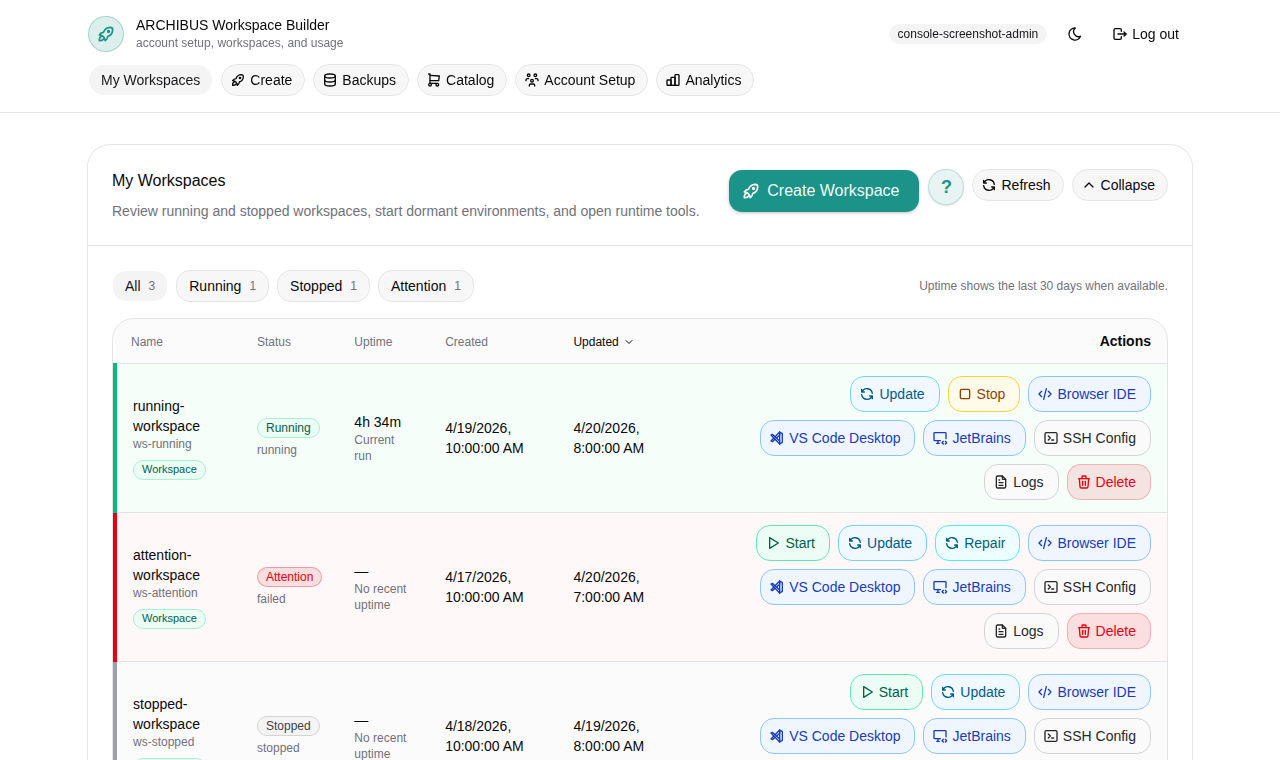
- Manage workspaces Use My Workspaces to start, stop, update, launch, schedule, inspect, and delete workspaces without leaving Console.
- Backups and restore sources Review, upload, organize, and select the database, WAR, and repository-linked restore artifacts that Create Workspace can inject.
- Work inside your workspace What you get inside a running workspace in code-server: the editor and its extensions, the Archibus app and database, logs, email testing, git, and where your files live.
- Use the ArchiBot VS Code extension Use ArchiBot in VS Code with a managed ArchiBot workspace, with a local Archibus folder, or with no folder open.
- Use the workspace bot Start ArchiBot inside code-server and put it to work: what it knows about your Archibus environment, what it can and can't do, ready-to-use prompts, and how it differs from Console chat.
- Workspace ArchiBot and Shared Drive Manage Shared Drive in Console across its five tabs - browse and edit files, create folders, upload evidence, grant scoped ArchiBot access, request staged restores, and create customer drives.
Billing And Usage
- Catalog and readiness Use Product Catalog to confirm billing details, choose prepaid workspace-time and managed AI packs, run checkout, and read orders, credit lots, and balance activity before anyone creates a workspace.
- Usage and billing Review customer-scoped workspace runtime, managed ArchiBot AI activity, platform resource usage, reconciliation posture, and billing readiness across the Analytics tabs, and set spending caps.
Support
- Troubleshooting Triage sign-in, setup, workspace creation, launch, logs, update, and billing-readiness issues from the Console workspace surfaces.
- Support handoff Open a sanitized support case from the Console Support tab, send quick notes with the global Feedback button, and keep secrets, one-time links, and account data out of every ticket.
- Sending feedback Use the global Feedback button to send a quick, structured note from any Console page. Pick a type and impact, add a subject and details, leave the page and account context attached, and keep the returned identifier for follow-up.
Review And Automation
- Console Bots Draft bounded ArchiBot bot work in chat, review the task packet, and run it only when customer policy, profile, and blueprint gates allow it.
- Persistent environments and CI Review Create shared persistent environments with the four-step wizard, set up CI workspace profiles, review merge events across the five CI tabs, and promote validated candidates from Console.
- Operations center Triage active CI, QA, bot, workspace, storage, and capacity signals from one scoped Console workbench.
Legal
- Privacy policy How ArchiBot collects, uses, shares, and protects personal information for Console, ArchiBot Chat, workspaces, support, and billing.
- End User License Agreement The baseline user terms for accessing ArchiBot Console, ArchiBot Chat, shared-hosted workspaces, managed AI routing, documentation, and related services.
Platform Operations
- Tenant Admin for operators Run the operator Access surface — pick the account boundary, then work members, permissions, workspace targets, billing policy, SSO, and onboarding evidence from one Console-owned desk.
- Workspace Help for operators Use the operator Workspace Help chat to triage workspaces across the fleet, read sanitized runtime evidence, and draft user-safe handoffs.
- Billing Help for operators Use the operator-only Billing Help chat to inspect a customer's billing state, clear credit and verification blockers, and apply audited support credit.
ArchiBot Chat
- ArchiBot Chat getting started Find ArchiBot Chat in the Console, understand the layout, and learn what to check before your first conversation.
- ArchiBot Chat setup Open the ArchiBot account section of Settings and finish Setup: confirm access, choose your plan and intended use, set file, API, and notification posture, then save.
- Using ArchiBot Chat Start threads, combine context sources, attach files, save prompts, and read responses on the Chat screen.
- ArchiBot Chat artifacts Browse the files you upload and the files ArchiBot generates, preview details, attach to chat, and download or delete without touching raw storage paths.
- ArchiBot Chat API keys Create, copy, rotate, and revoke generated API keys, and wire an external coworker tool to the public ArchiBot endpoint.
- ArchiBot Chat billing and credits Review plans, the shared chat and API credit pool, monthly budget controls, Stripe checkout, and the customer portal from the chat Billing screen.
- ArchiBot Chat access and SSO Submit your identity provider details on the Single sign-on step so ISM can wire organization sign-in.
- ArchiBot Chat troubleshooting Diagnose common Chat, API key, billing, file upload, SSO, and Activity problems, then gather the right detail before you open a case.
- ArchiBot Chat activity and audit Review account lifecycle history and notifications from the Console Activity tab for supportable evidence without raw secrets.
- ArchiBot Chat approved data use Know what data is approved for hosted commercial ArchiBot Chat and when to request an enterprise review.
- ArchiBot Chat support cases Send an account-scoped support request from the Console and include useful evidence without exposing secrets.
- ArchiBot Chat security overview Review customer-visible security controls for access, credentials, artifacts, audit, backups, and data boundaries.
- ArchiBot Chat subprocessors and service providers Understand service-provider categories used by hosted commercial ArchiBot Chat.