


Getting Help
Support handoff
Open a sanitized support case from the Console Support tab, send quick notes with the global Feedback button, and keep secrets, one-time links, and account data out of every ticket.
Last updated
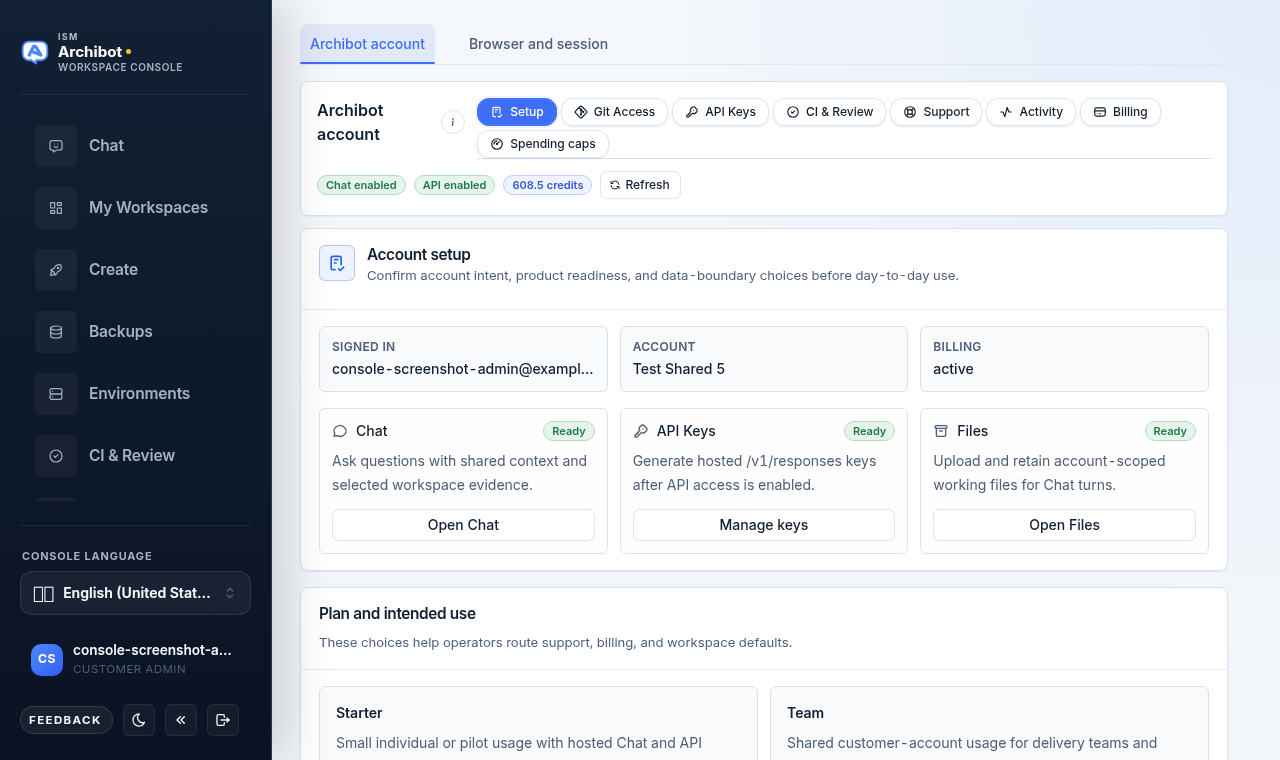
There are two ways to reach ISM from inside the Console: the Support tab in your ArchiBot account, for a structured case with a category and severity, and the global Feedback button, for a quick note from any page. Both routes capture the same kind of context, so use whichever is closer to where you hit the problem.
This guide covers where each control lives, what to fill in, and what to keep out of every ticket.
Open the Settings Support tab
- In the Console sidebar, open your account and go to Settings.
- Stay on the ArchiBot account tab (the other tab is Browser and session).
- In the ArchiBot account card, select the Support pill. The pill row reads, left to right: Setup, Git Access, API Keys, CI & Review, Support, Activity, Billing, and Spending caps.
The Support tab shows a single intake form. There is no in-Console list of past cases here, so keep your own reference number from the confirmation notice (see below) if you need to follow up.
Fill in the support form
The form has four inputs:
- Short title — a one-line summary, for example “Workspace start failed after update.”
- Category — choose one of: Chat, API, Billing, Access, Artifacts, Account, or Other.
- Severity — choose Low, Normal, High, or Urgent.
- What happened — the longer description. This is where the context below goes.
Select the submit button to send the case. When it succeeds, a confirmation notice appears at the top of the form, sometimes with a reference identifier and a link to the tracked item. Record that identifier; the form does not keep a visible history for you.
Send quick notes with the Feedback button
For anything that does not need a full case — a guidance gap, stale docs, a small bug, or a quick win — use the Feedback button at the bottom of the Console sidebar. It opens a dialog you can submit from any page, and it automatically tags the page you were on.
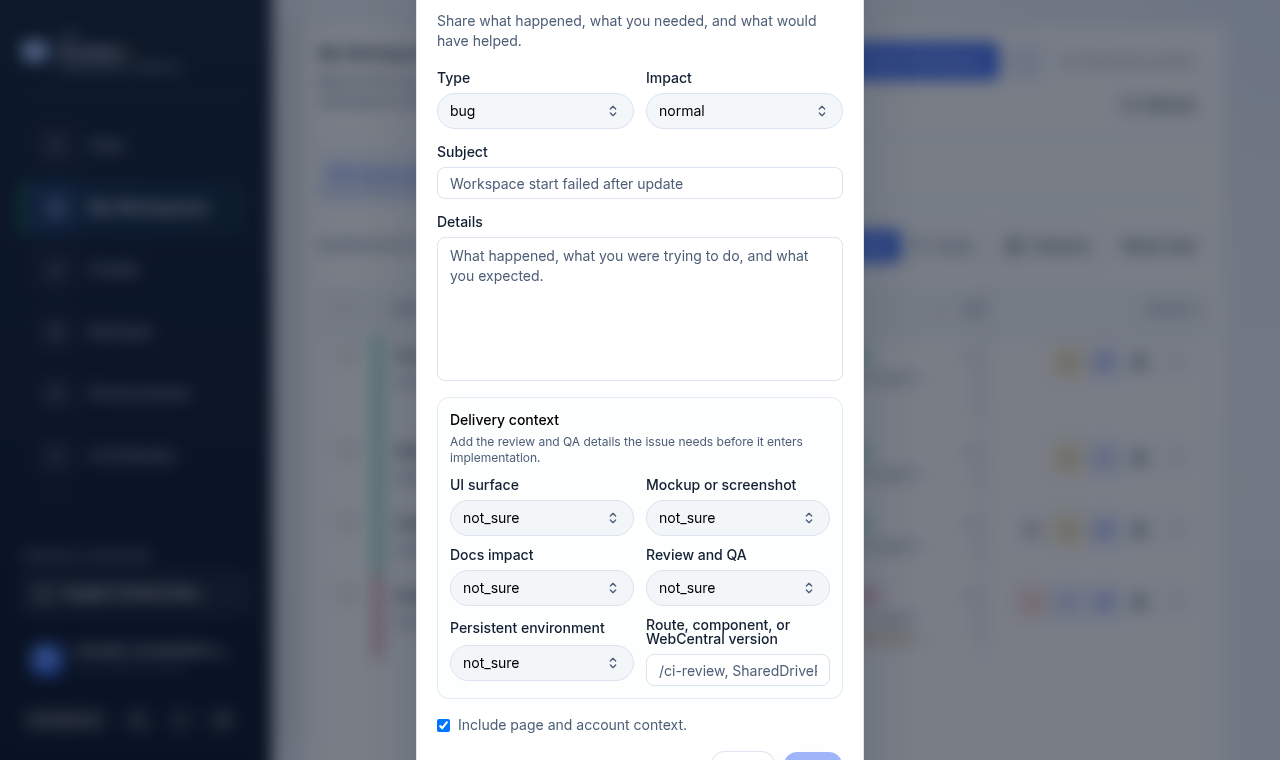
The dialog fields are:
| Field | What to set |
|---|---|
| Type | Bug, Blocked, Guidance gap, Stale docs, Request, or Win. |
| Impact | Normal, High, Urgent, Low, or Positive. |
| Subject | One-line summary (up to 140 characters). |
| Details | What happened, what you were trying to do, and what you expected. |
A Delivery context group adds optional routing hints (UI surface, mockup or screenshot status, docs impact, review and QA, persistent environment, and a free-text view note). Leave these on their defaults if you are not sure; they help ISM route the report but are not required.
The Include page and account context checkbox is on by default. It attaches the current page path and basic account context (no secrets) so support can find the right surface faster. Select Send to submit; a confirmation appears in the dialog when it goes through.
What to include
Whichever route you use, put enough in the description for support to act without a back-and-forth:
- Company or customer account.
- Console username or email.
- Role you expected to use.
- Page or action.
- Workspace name when relevant.
- Approximate time and timezone.
- Expected result.
- Actual result.
- Visible error message.
- Whether a workspace was being created, started, stopped, updated, or deleted.
What not to include
Do not include passwords, private keys, API keys, cookies, raw tokens, one-time invite links, database URLs, webhook secrets, payment credentials, kubeconfigs, pod environment, or raw provider payloads.
Avoid screenshots that expose private repository URLs, session details, provider identifiers, or account data unless ISM specifically requests a secure evidence path.
Customer support template
Paste this into the What happened field or the Feedback Details field and fill it in:
Customer:
User:
Role:
Page:
Action:
Workspace:
Time and timezone:
Expected result:
Actual result:
Visible error:
What I tried:
Workspace issue template
For workspace create, start, update, or delete problems, add cleanup status so support knows whether anything is half-built:
Workspace name:
Workspace status:
Action attempted:
Last visible build or launch state:
Editor access (desktop editor or SSH):
Create/update/delete cleanup status:
Visible blocker:
Triage levels
| Type | First owner | Include |
|---|---|---|
| Account access | Customer admin, then ISM support | User, role, company, visible navigation. |
| Workspace creation | Customer admin or ISM support | Template, target, visible blocker, workspace name. |
| Launch or build failure | ISM support | Workspace name, action, status, visible error. |
| Billing or Catalog gate | Customer admin, then ISM support | Catalog readiness, billing state, visible blocker. |
Operator handoff
Platform operators should record sanitized evidence, cleanup status, customer-visible impact, next action, and next owner.
Keep credentials, private operational notes, raw provider payloads, and customer-hidden risk notes out of any customer-visible field.
Related guides
- Troubleshooting — try the common fixes before opening a case.
- Console settings and accessibility — where the Settings page and account tabs live.
- Manage workspaces — workspace states and cleanup for build or launch issues.
- Catalog and readiness — for billing and Catalog gate blockers.
- Tenant Admin for operators — operator-side handoff context.
Done When
- Issue summary includes page, action, time, and visible error.
- No secret values or one-time links are included.
- Cleanup status is clear for workspace create, update, or delete issues.
- Next owner is clear: customer admin, ISM support, or platform operator.