
Getting Started
Welcome to ArchiBot
Learn what ArchiBot Console is for, how first sign-in works, where you land after signing in, and what information is safe to share.
Last updated
What ArchiBot Console is for
ArchiBot Console is the customer-facing place to prepare an account, create ArchiBot workspaces, open them in an editor, review usage, and get support. Normal customer work should never require service tokens, Kubernetes access, internal service addresses, or platform admin tooling.
Use Console for:
- Account setup and customer onboarding details.
- Inviting users and reviewing customer roles.
- Creating workspaces from approved templates and backups.
- Reviewing CI & Review, Environments, and Shared Drive status when your role allows it.
- Watching customer-scoped Operations for active CI, QA, bot, workspace, storage, and capacity signals.
- Opening ArchiBot in your browser or handing off to a desktop editor.
- Stopping, updating, or deleting customer workspaces.
- Reviewing usage and billing readiness when your role allows it.
How to sign in for the first time
- Open the Console URL provided by ISM.
- On the sign-in page, choose Continue with SSO.
- Complete your organization’s sign-in or accept your invite.
- Return to Console and confirm the left navigation rail matches your role.
If you land on an access-denied page, sign out of the identity provider and reopen the Console URL. If the same problem repeats, send support the company name, your email, the role you expected, and the approximate time of the failed sign-in. Do not send invite tokens or cookies. See Troubleshooting and Support handoff for what to include.
Where you land after signing in
Console picks your first screen automatically:
- If your account has ArchiBot Chat access with available credits, Console opens Chat directly. This is the default for chat-first accounts.
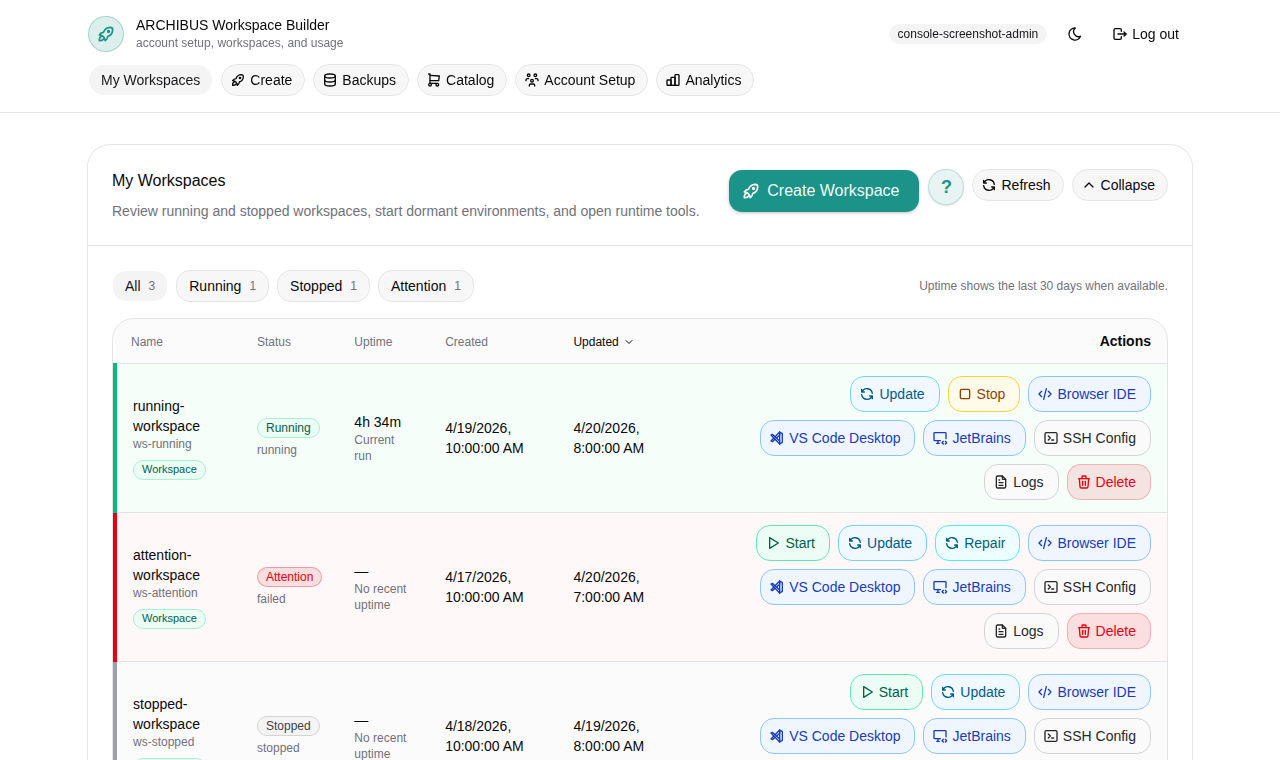
- Otherwise you land on My Workspaces, the workspace grid shown above.
- If your account still needs setup, Console routes you to Account Setup (customer admins) or platform access (operators) until the basics are complete.
You can always switch sections from the left rail. Selecting Chat or My Workspaces in the rail takes you where you expect even if the automatic default sent you elsewhere.
The My Workspaces landing surface has three tabs:
| Tab | What it shows |
|---|---|
| Workspace grid | Your workspaces as a table or cards, with status, schedule, and per-row actions. |
| Filter workspace list | Filters for template, target, source, status, and more to narrow a large fleet. |
| Fleet summary | Roll-up counts for running, attention, and total workspaces. For personal scopes this is labeled Workspace summary. |
To learn the grid, columns, and per-row controls in detail, read Manage workspaces.
The navigation rail and its footer
The left rail lists only the sections your role can open. Common entries include Chat, My Workspaces, Create, Backups, Environments, and CI & Review. Customer admins and operators also see Bots and Operations. The rail footer holds a few account-wide controls:
- Console language selector to switch the interface language.
- Feedback to send a note to the ArchiBot team.
- A theme toggle for light or dark mode.
- A collapse control to narrow the rail.
- Your account chip (initials, email, and role) that opens your account access page.
- Log out.
For language, theme, and accessibility options in depth, see Console settings and accessibility.
Confirm your role
The account chip in the rail footer shows the role Console is using for you, such as Customer admin, Customer member, Customer viewer, Platform operator, or Platform admin. If your role looks wrong, the navigation will also be wrong, so confirm it before you start work.
Some operator and admin accounts can preview a customer role from the rail footer to see what a customer admin or member sees. When a role preview is active, an eye indicator appears and you can stop the preview at any time. Role preview only changes what you see in Console; it does not change anyone’s real permissions. For the full role model, read Access roles.
What to do next
| Role | First page | Goal |
|---|---|---|
| Customer admin | Account Setup | Confirm company details, SSO status, invites, readiness, and customer Operations. |
| Customer member | My Workspaces | Start or create the workspace assigned to your customer account. |
| Platform operator | Platform access | Review customer setup, billing state, SSO handoff, CI/review posture, environments, Shared Drive evidence, and support context. |
| Platform admin | Platform access | Review platform-wide customer boundaries and policy-sensitive operations when required. |
Good next steps:
- Customer admins: Customer admin setup.
- Anyone creating their first workspace: Create the first workspace.
- Chat-first accounts: ArchiBot Chat getting started.
A note on deleting workspaces
When you delete a workspace from the grid, Console shows a confirmation dialog before anything is removed. The dialog names the workspace and asks you to confirm the delete, so a single misclick will not destroy work. Read the dialog, confirm the workspace name matches, and only then confirm. Stopping a workspace is reversible; deleting one is not. See Manage workspaces for the full stop, update, and delete flow.
Safe information sharing
Share company contacts, repository locations, backup choices, non-secret identity-provider metadata, role expectations, and visible Console error messages.
Do not share passwords, private keys, API keys, cookies, raw tokens, one-time invite links, webhook secrets, database URLs, payment credentials, kubeconfigs, or screenshots that expose those values.
Quick recovery guide
| Symptom | First action | Escalate with |
|---|---|---|
| Expected page is missing | Confirm your role in the account chip, then sign out and back in. | Email, company, expected role, visible navigation. |
| Invite opens access denied | Sign out of the identity provider and reopen the invite. | Invite recipient email and approximate time, not the invite link. |
| Workspace create is blocked | Read the blocker and open the relevant guide. | Workspace target, template, visible blocker, and account name. |
Done When
- You can sign in through the expected identity provider.
- The navigation rail matches your role.
- You know whether you land in Chat or My Workspaces, and which page to open next.