

Permissions
Access roles
Read your Account access card to confirm how Console sees your session, identity claims, and customer membership, and understand what each ArchiBot role can do.
Last updated
What this page is for
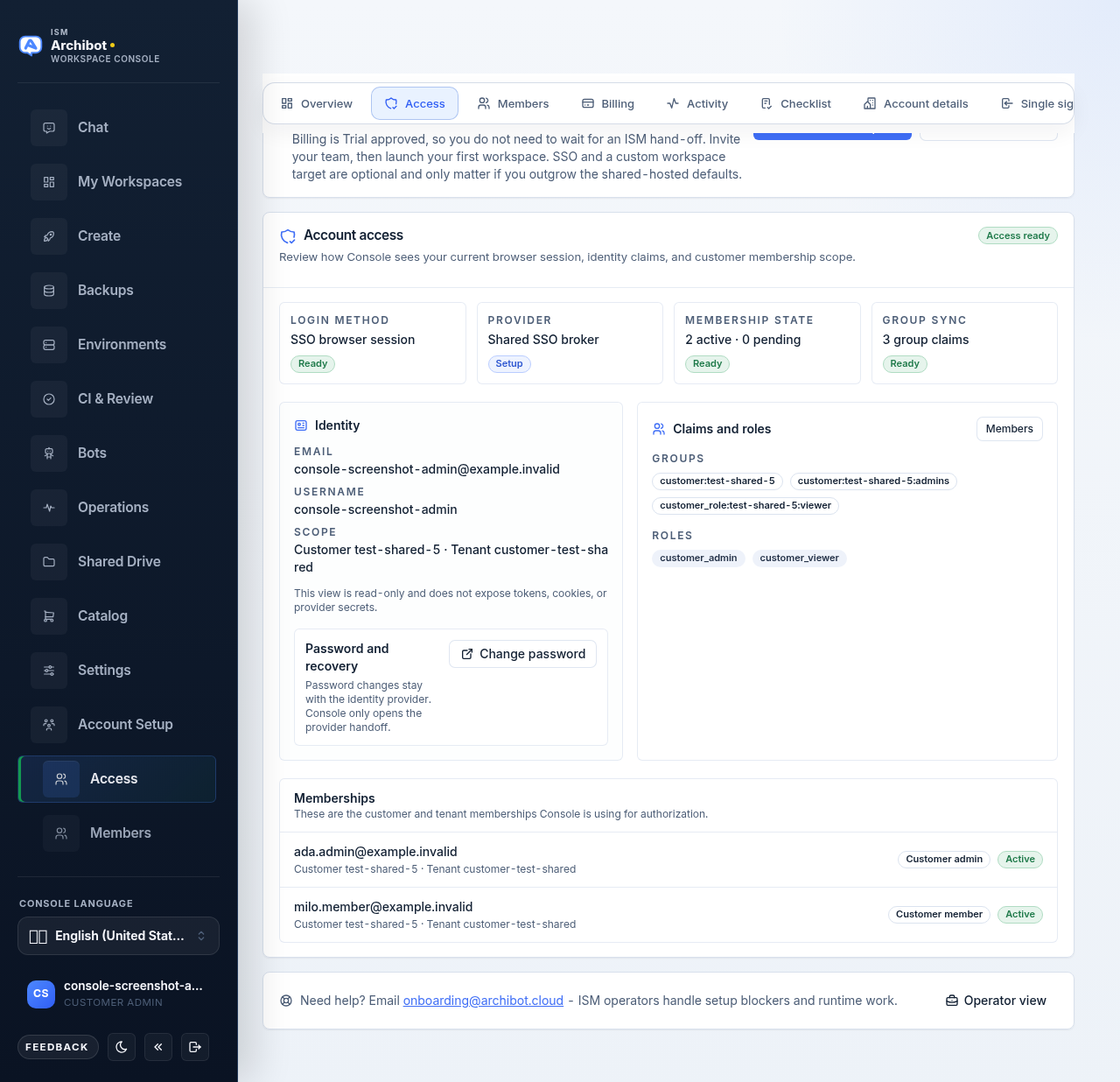
ArchiBot uses role-aware navigation, so the same Console URL can show different pages to different people on the same customer account. The Access page at /account/access does not change permissions. It is a read-only summary that shows how Console currently sees you: your login method, your identity claims, and the customer membership scope your access comes from.
Use it to answer one question quickly: does Console see me the way I expect? If a page is missing or an action is blocked, the Account access card usually shows why.
This view never exposes tokens, cookies, or provider secrets.
Open the Account access card
- Sign in to Console.
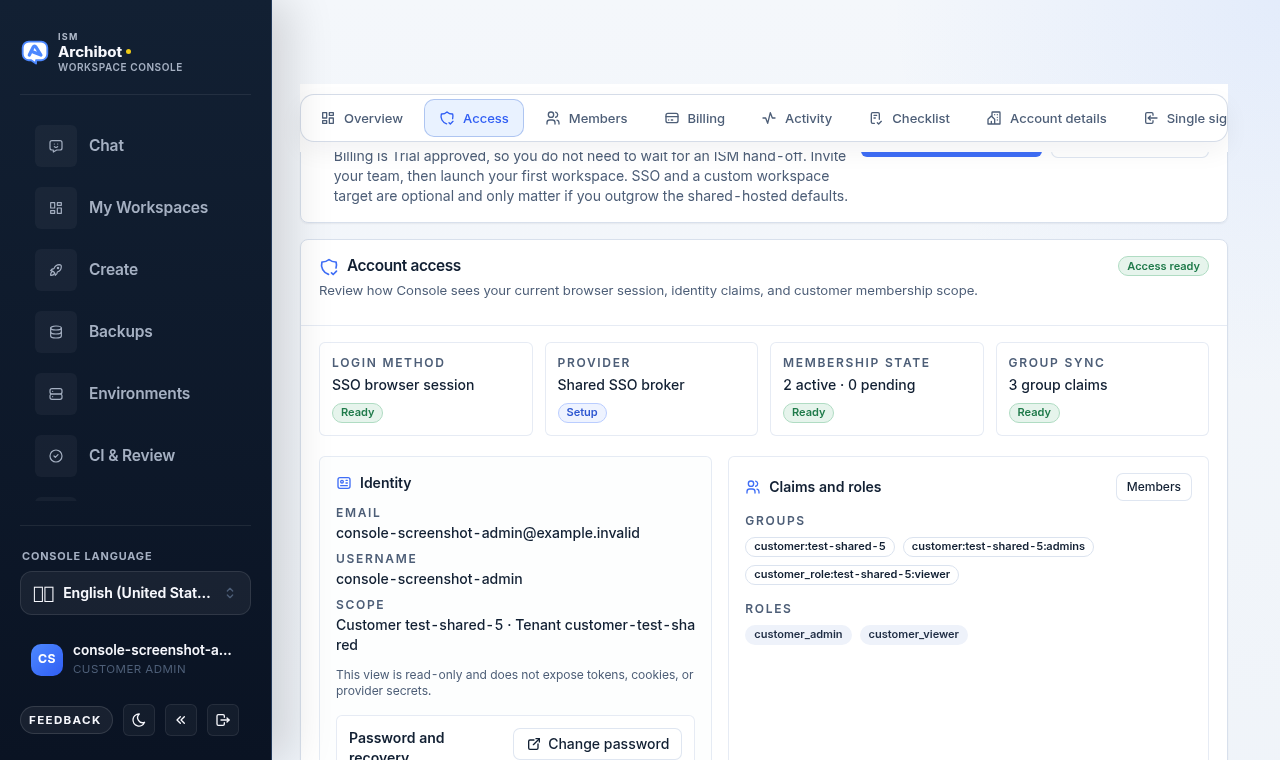
- In the account area, open the Access tab. On wider screens it sits alongside Overview, Members, Billing, Activity, Checklist, and Account details.
- Read the Account access card. A badge in the top right shows Access ready when at least one active membership is attached, or Scope needed when no active membership is found yet.
Read the four status tiles
The top of the card has four tiles that summarise the current session.
| Tile | What it tells you |
|---|---|
| Login method | How you signed in, for example an SSO browser session. |
| Provider | The identity provider or session authority, or the shared SSO broker when no specific provider is named. |
| Membership state | A count of active and pending memberships, for example “2 active - 0 pending”. |
| Group sync | How many group claims arrived with this session, or that no groups are present. |
Each tile carries a small Ready or Setup badge so you can scan posture at a glance. “Setup” does not mean something is broken; it flags an area that may still need attention, such as a password-fallback provider or a session that arrived with no group claims.
Read the Identity panel
The Identity panel on the left lists the core facts about your session:
- Email and Username as Console received them.
- Scope - the customer and tenant your access is bound to, shown as a customer and tenant pair.
A short note under these fields reminds you that the view is read-only.
Change your password
If your identity provider supports a password change, a Password and recovery box appears with a Change password button. Selecting it opens your identity provider’s password page in a new tab. Console never sets or stores the password itself; it only opens the provider handoff.
If you sign in through SSO with no password fallback, the Password and recovery box does not appear. In that case, manage your password wherever your organisation manages SSO sign-in.
Read the Claims and roles panel
The Claims and roles panel on the right shows what authorization data Console read from your session:
- Groups - group claims from your identity provider, shown as pills. If there are none, Console notes that access can still come from stored tenant memberships.
- Roles - explicit role claims, shown as pills.
- Provider - the authorization sources that contributed to your access, when present.
Customer admins also see a Members button in this panel. Selecting it opens the Members page, where admins invite people and change member roles. That page is covered in the customer admin guide.
Read the memberships list
Below the panels, the Memberships list shows the customer and tenant memberships Console is using for authorization. Each row shows the member, the customer and tenant scope, a role badge, and a status badge (active or pending). A footer line counts any disabled memberships.
If no membership records are attached to your identity yet, Console shows a notice instead of a list. That is the usual reason a member sees fewer pages than expected.
What each role can do
The Account access card reflects your role. The table below summarises what each role is responsible for and what stays hidden by design.
| Role | Main responsibilities | Hidden by design |
|---|---|---|
| Customer member | Create, start, use, and stop workspaces; review their own usage. | Account setup, billing review, platform controls, and sibling customers. |
| Customer admin | Complete setup, invite and manage members, review readiness, monitor customer Operations, and view usage. | Platform license controls and unrelated customers. |
| Platform operator | Assist onboarding, billing handoff, SSO source setup, target readiness, and support. | Platform-admin-only global controls unless also an admin. |
| Platform admin | Platform-wide review, customer-boundary changes, and policy work that needs global authority. | Customer-specific data should not change without a clear operational reason. |
When your role looks wrong
- Open the Access tab and read the four tiles and the Memberships list.
- If Membership state shows no active memberships, or the list shows a “no membership records” notice, your scope has not been attached yet.
- Sign out and sign back in once. Group and role claims are read at sign-in, so a fresh session can pick up a recent change.
- If it still looks wrong, ask a customer admin to check your membership on the Members page, or open a support handoff.
Related guides
- Welcome to ArchiBot
- Customer admin setup
- Console settings and accessibility
- Tenant Admin for operators
- Support handoff
Done When
- The Account access card shows four tiles - Login method, Provider, Membership state, and Group sync.
- The Identity panel lists your email, username, and customer or tenant scope.
- The Claims and roles panel lists the groups and roles Console reads from your session.
- Customer admins see a Members button that opens the Members page.