


Workspaces
Workspace presets
Workspace presets are not available as a separate surface. Reuse a known-good launch shape by configuring Create Workspace directly, keeping secrets out of any saved configuration.
Last updated
What changed
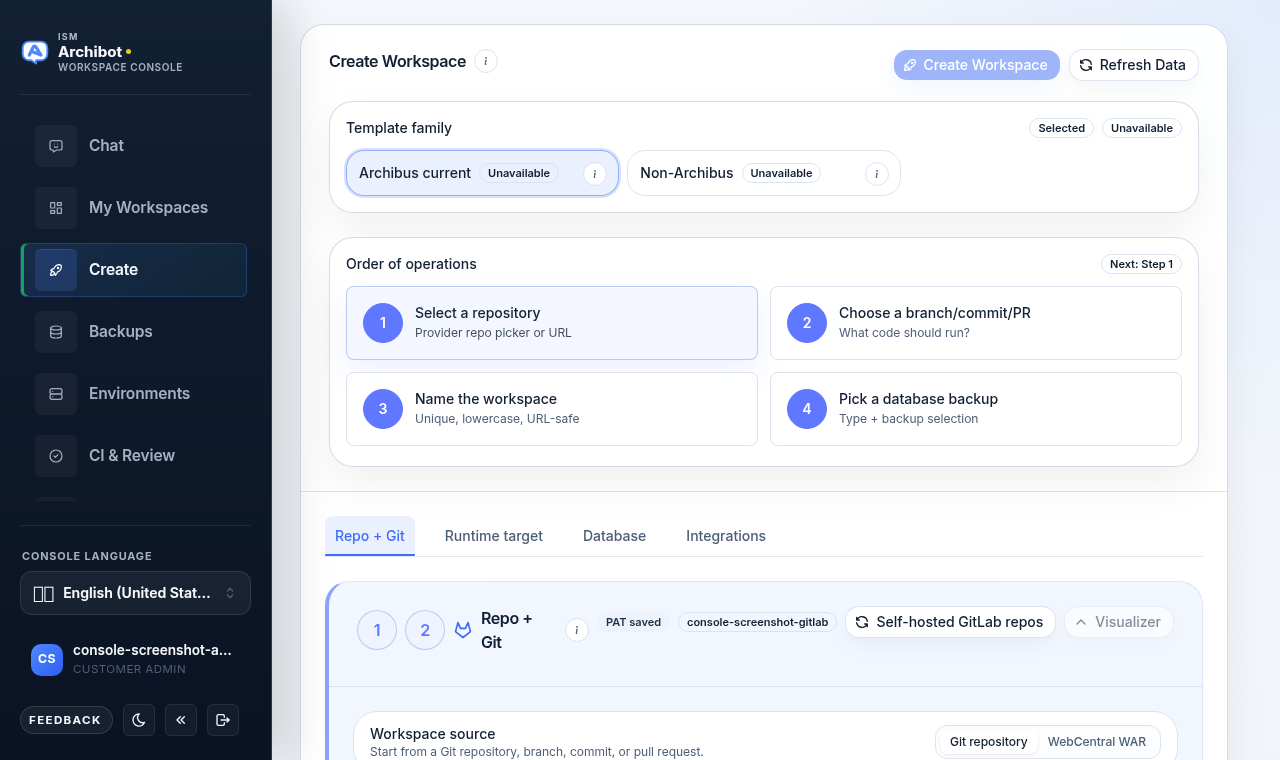
Workspace presets are no longer a separate Console surface. There is no Presets entry in the navigation, and the in-Create preset library is turned off. If you follow an old link or bookmark to /presets, the Console forwards you straight to Create Workspace.
This guide stays published so older links keep landing somewhere useful and so you know where the equivalent configuration lives now. If you were looking for a saved-preset library, use Create Workspace directly instead.
Where launch configuration lives now
Every launch is configured in Create Workspace, on /create. The wizard keeps the repeatable shape you used to put in a preset right in the tabs:
| You used to set this in a preset | You now set it here |
|---|---|
| Template family | The Archibus current / Non-Archibus selector at the top of Create Workspace. |
| Repo, branch, or pull-request defaults | The Repo + Git tab. |
| Runtime and cloud target | The Runtime target tab. |
| Database type and backup shape | The Database tab. |
| Integration posture | The Integrations tab. |
The Order of operations cards summarize the same four decisions in sequence: select a repository, choose a branch/commit/PR, name the workspace, and pick a database backup.
Reuse a known-good launch shape
Without a preset library, the reliable way to repeat a launch is to keep the structure consistent and re-enter it:
- Open Create from the left navigation.
- Pick the same template family you used last time.
- On Repo + Git, point at the same repository and branch strategy.
- On Runtime target and Database, match the runtime, cloud target, and backup shape from the previous reliable launch.
- On Integrations, set the same integration posture if your launch needs it.
- Provide tokens, private keys, and provider credentials fresh at launch time, then create the workspace.
Customer admins can standardize this by documenting the repository, branch strategy, runtime target, and backup shape your team should reuse, so members enter the same values each time.
Keep secrets out of saved configuration
Treat any launch shape you record, whether in a team runbook or your own notes, as structure only. Keep these out of anything you save or share:
- Personal access tokens and SSH private keys
- Provider secrets and payment details
- Invite links or anything account-specific
Supply those values directly in Create Workspace at launch time. They are never part of a reusable launch shape.
Related guides
- Create the first workspace for the full Create Workspace flow, tab by tab.
- Manage workspaces for what to do after a launch.
- Backups and restore sources for the restore artifacts you select on the Database tab.
- Catalog and readiness for the template families and targets available to your tenant.
Done When
- There is no Presets entry in the Console navigation.
- Opening /presets forwards you to Create Workspace.
- You configure each launch from the Create Workspace tabs, not a saved preset library.
- Secrets such as tokens and private keys are supplied at launch time, never stored.